

Learn what the ext:asp intitle:cart Google search operator does, how to use it for SEO research and site audits, and how to protect legacy ASP shopping carts.
Introduction: Why ext:asp intitle:cart Matters
If you work in SEO, web development, e-commerce, or cybersecurity, you have probably seen strings like ext:asp intitle:cart in forums, audit checklists, and training courses. It looks cryptic, but it is a precise search query that combines two Google operators to surface a specific kind of page: Active Server Pages (ASP) files whose title contains the word “cart.”
The query matters for three reasons. First, millions of legacy e-commerce sites still run on Classic ASP, and many were never updated. Second, shopping cart pages are among the most sensitive pages on any website because they sit next to customer data and payments. Third, search operators let you find, in seconds, what would otherwise take hours of manual crawling.
This guide explains what ext:asp intitle:cart means, how it works, and how to use it responsibly for SEO research, competitor analysis, and security hygiene. It also covers related keywords and what to do if you own an older ASP store.
What ext:asp intitle:cart Actually Means
The string has two parts joined by a space, which Google treats as an implicit AND:
- ext:asp limits results to files ending in the .asp extension.
- intitle:cart limits results to pages with “cart” in the HTML title tag.
Together they ask Google to return only ASP pages that have “cart” in their title. Typical matches include pages titled “Shopping Cart,” “View Cart,” “Your Cart,” or “Cart Summary,” served from URLs such as /shop/cart.asp or /store/viewcart.asp.
Why people search this way
Searchers use the combination to narrow a very large index down to a small, specific group of pages. A normal search for “shopping cart” returns millions of results from every platform and language. Adding the two operators filters out modern frameworks, PHP stores, and hosted platforms like Shopify, leaving a focused list of ASP-based cart pages.
How Google Search Operators Work
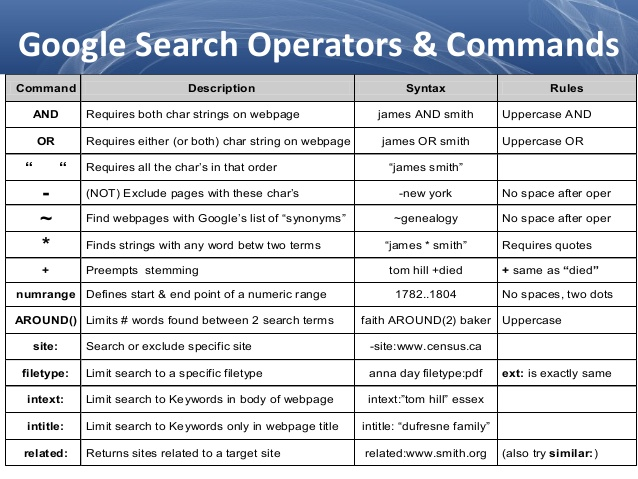
Search operators are special commands that modify how Google interprets your query. They are written as an operator, a colon, and a value, with no space after the colon.
Common operators related to this query
- site: restricts results to one domain, such as site:example.com.
- intitle: requires a word in the page title.
- allintitle: requires all following words in the title.
- inurl: requires a word in the URL.
- filetype: and ext: limit results by file extension.
- Quotation marks force exact-phrase matching.
- Minus sign (-) excludes a term.
Practical example
Suppose you want ASP cart pages but not pages from a particular hosting provider. You could write:
ext:asp intitle:cart -site:example.com
This keeps your results focused and removes noise you already know about.
Understanding the ext Operator and Classic ASP
The ext: operator works like filetype:. It tells Google to return documents with a given extension. In this case, .asp points to Classic ASP, Microsoft’s older server-side scripting technology introduced in the late 1990s.
What Classic ASP is
Classic ASP runs on Internet Information Services (IIS) and uses VBScript or JScript to generate HTML on the server. Many early online stores were built on it because it was easy to deploy and well supported.
ASP vs. ASPX
Don’t confuse .asp with .aspx:
- .asp is Classic ASP, mostly legacy.
- .aspx is ASP.NET Web Forms, a newer and more structured framework.
If you want ASP.NET pages, use ext:aspx instead. If you want both, run two separate searches, because a single query can’t use two ext: values without an OR.
Understanding the intitle Operator and Cart Pages
The intitle: operator restricts matches to the <title> element of a page. The title is a strong signal of what a page is about, which is why this operator is useful for finding specific page types.
Why “cart” is a useful title keyword
E-commerce platforms usually give cart pages predictable titles. Searching for “cart” in the title tends to surface:
- Shopping cart views
- Cart summary and update pages
- Add-to-cart confirmation pages
- Abandoned cart recovery pages
Practical example
intitle:cart ext:asp returns the same results as ext:asp intitle:cart, since the order of operators doesn’t change the outcome. To match a more specific title, try ext:asp intitle:”shopping cart”, which requires the exact phrase.
Legitimate Uses for SEO and Competitor Research
Used ethically, this operator combination is a research tool. Here is how marketers and SEO professionals apply it.
Finding indexation problems
Cart pages usually shouldn’t appear in search results. If you search site:yourstore.com ext:asp intitle:cart and find cart URLs in Google’s index, you have an indexation issue. Cart pages offer no value to searchers and can waste crawl budget.
Analyzing legacy competitors
If you operate in a niche where competitors still run older ASP stores, this query helps you spot them at the category level. Older platforms often mean slower pages, weaker mobile experience, and gaps in structured data. These are opportunities for you to outrank them with a modern site.
Identifying link and partnership prospects
Some older merchants are open to platform migration services, agency partnerships, or acquisition. Agencies that specialize in replatforming use operator searches like this to build prospect lists, then contact owners through their publicly listed business channels.
Auditing Your Own Legacy ASP Store
The safest and most valuable use of ext:asp intitle:cart is looking at your own domain. A quick self-audit can reveal problems before someone else finds them.
Step-by-step self-audit
- Run site:yourdomain.com ext:asp intitle:cart in Google.
- Note every URL returned, including parameters.
- Check whether the pages expose session IDs, product IDs, order numbers, or customer information in the URL.
- Confirm that pages which shouldn’t be indexed carry a noindex directive.
- Repeat with variations such as ext:asp intitle:checkout and ext:asp intitle:basket.
What to look for
- Cart URLs that include readable query strings such as ?orderid= or ?customer=
- Pages that show error messages revealing server paths or database details
- Old test or staging cart pages that were never removed
- Duplicate cart pages created by different URL parameters
Security and Privacy Risks of Exposed Cart Pages
This is the part of the topic that deserves the most care. Search operators like these are sometimes called “Google dorks,” and they are discussed in security circles because they show how much information search engines can index. Pages that were never meant to be public can end up in results.
Why legacy ASP carts are a concern
Older Classic ASP code often predates modern security practice. Common weaknesses include:
- Missing input validation
- SQL queries built through string concatenation
- Session handling that exposes identifiers in URLs
- Outdated server software that no longer receives patches
- Verbose error pages that leak internal details
An ethical boundary
Finding a page in a search result is not permission to probe it. Testing a site you don’t own or have written authorization to assess can break computer misuse laws in many countries. If you discover an exposed cart page that leaks customer data, the responsible action is to notify the site owner or use a recognized disclosure channel, not to explore further.
Protecting your own site
- Add authentication and session protection to anything that exposes order data.
- Use parameterized queries for every database call.
- Serve everything over HTTPS.
- Disable detailed error messages in production.
- Keep server and component software patched, or retire the platform.
Practical Query Variations and Related Keywords
The core query is one of many. These variations and related keywords help you cover the whole topic, and they are also useful phrases to include in your content strategy.
Related searches
- ext:asp intitle:checkout for checkout pages
- ext:asp intitle:basket for sites using “basket” instead of “cart”
- ext:asp inurl:cart for cart pages identified by URL rather than title
- ext:asp intitle:”shopping cart” for the exact phrase
- ext:aspx intitle:cart for ASP.NET stores
- filetype:asp intitle:cart as an equivalent form using filetype
- inurl:viewcart.asp for a common filename
- site:yourdomain.com intitle:cart for a single-site audit
Related keyword themes
Good supporting terms include Google dorking, Google advanced search operators, Classic ASP shopping cart, legacy e-commerce security, ASP to ASP.NET migration, e-commerce SEO audit, and cart page indexing.
Combining operators
You can layer operators to refine results. For example:
ext:asp intitle:cart inurl:store -inurl:test
This looks for ASP cart pages with “store” in the URL while excluding test directories.
Migrating from Classic ASP Carts to Modern Platforms
If your audit shows that you still depend on a Classic ASP cart, planning a migration is the most durable fix. Microsoft has long treated Classic ASP as legacy technology, and the longer you wait, the harder the move becomes.
Signs it is time to migrate
- Your cart breaks when your hosting environment is upgraded.
- You can’t find developers who know the codebase.
- Your payment integration relies on deprecated gateways.
- Your pages are slow and fail Core Web Vitals.
- Your store isn’t usable on mobile devices.
Migration options
- Hosted platforms such as Shopify or BigCommerce reduce maintenance and security burden.
- Open-source platforms such as WooCommerce or Magento offer flexibility with more responsibility.
- ASP.NET Core custom builds suit businesses with unique requirements and in-house developers.
Protecting your SEO during migration
Map every old .asp URL to its new equivalent with 301 redirects. Keep category and product URLs stable where possible, update your sitemap, and monitor Google Search Console for crawl errors in the weeks after launch. Cart and checkout URLs usually don’t need to rank, so concentrate redirect effort on product and category pages.
SEO Best Practices for Cart and Checkout Pages
Whether your cart runs on ASP or something newer, the same SEO principles apply. Cart pages exist to complete purchases, not to attract search traffic.
Keep cart pages out of the index
Add a noindex robots meta tag to cart, checkout, and account pages. Disallowing them in robots.txt can also help, but be aware that a blocked page can still appear in results as a bare URL if other pages link to it. A noindex tag is the more reliable control.
Write clear, consistent titles
Use sensible titles like “Your Shopping Cart | Brand Name.” Consistent naming helps users and analytics, and it makes your own audits easier.
Avoid exposing parameters
Don’t put sensitive or session-related data in query strings. Use cookies or server-side sessions instead, and use canonical tags where parameter variations create duplicates.
Improve performance
Cart abandonment rises when pages are slow. Compress assets, reduce scripts, and make sure the cart works smoothly on mobile.
Practical example
A small retailer found 340 cart URLs indexed under /shop/cart.asp? with different parameters. After adding noindex tags, consolidating parameter handling, and submitting a cleaned sitemap, those URLs dropped out of the index within a few weeks and crawl activity shifted toward product pages.
Conclusion
The query ext:asp intitle:cart looks like a simple string, but it shows how much you can learn from search operators. It combines a file-extension filter with a title filter to isolate ASP-based cart pages, and in the right hands that precision is useful. SEO professionals use it to find indexation problems and map legacy competitors. Developers and store owners use it to audit their own sites, and agencies use it to scope migration work.
The same visibility is also why legacy cart pages deserve attention. Anything a search engine can index can be found by anyone, so the responsible approach is to run these searches against your own properties first, close the gaps you find, and never test systems you don’t have permission to assess.
If you still rely on Classic ASP, treat this guide as a starting checklist. Audit with site:yourdomain.com ext:asp intitle:cart, noindex what shouldn’t be public, fix the security basics, and plan a move to a supported platform. Do this and your cart pages will do their job quietly in the background, completing sales without becoming a liability.
 WildRise
 IQnewswire